

If you want to work with an API in your React project, then GraphQL may be the solution for you. This is made easy with Apollo Client, a state-management library that gives you the tools needed to handle API data.
Today we will do a simple example to display a list of countries with their official languages using the following API, which you can see in the GraphQL playground here:
https://countries.trevorblades.com/
Procedure
In order to use create-react-app, you’ll need to install Node and npm:
- Node: https://nodejs.org/
- npm: https://www.npmjs.com/
Now that we have the environment set up, let’s use create-react-app to make a new project:
npx create-react-app my-graphql-app
Go inside the project directory:
cd my-graphql-app
Now start the local development server:
npm run start
Now the app will automatically open to localhost:3000 in your browser:

Let’s install some dependencies to use GraphQL and Apollo:
npm install graphql @apollo/client
Now we will configure Apollo and GraphQL to work in our app, as well as define the API:
index.js
import React from 'react';
import ReactDOM from 'react-dom/client';
import './index.css';
import App from './App';
import reportWebVitals from './reportWebVitals';
import { ApolloClient, ApolloProvider, InMemoryCache } from '@apollo/client';

const  client = new  ApolloClient({
  uri :  'https://countries.trevorblades.com/',
  cache:  new  InMemoryCache(),
});

const root = ReactDOM.createRoot(document.getElementById('root'));
root.render(
  <React.StrictMode>
    <ApolloProvider client={client}>
      <App />
    </ApolloProvider>
  </React.StrictMode>
);

// If you want to start measuring performance in your app, pass a function
// to log results (for example: reportWebVitals(console.log))
// or send to an analytics endpoint. Learn more: https://bit.ly/CRA-vitals
reportWebVitals();
The last step is to write a query to fetch all the world’s countries with their official languages listed:
App.js
import './App.css';
import React from 'react';
import { useQuery, gql } from '@apollo/client';

const COUNTRY_LIST = gql`
query {
  countries {
    name
    languages {
      name
    }
  }
}`;

function App() {
  const { loading, error, data } = useQuery(COUNTRY_LIST);

  if (loading) return (<> Loading</>);
  if (error) return (<>{JSON.stringify(error)}</>);

  return (<>
    {data.countries.map((country) => {
      return <ul key={country.name}>
        <li>{country.name}</li>
        <ul>{country.languages.map((language) => {
          return <li key={language.name}>{language.name}</li>;
        })}</ul>
      </ul>;
    })}
  </>);
}

export default App;
Go back to the browser to see the result:
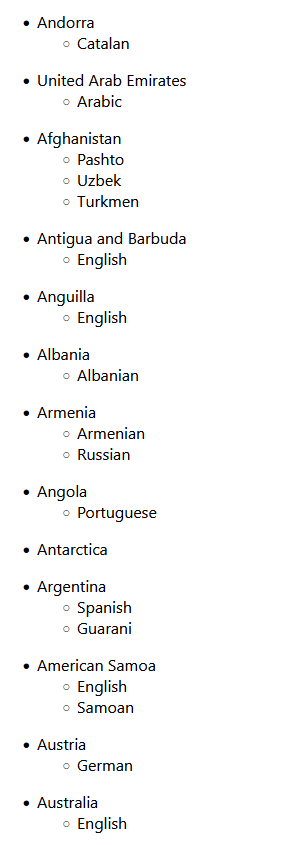
…and that is it! Now you have a basic example with the React, GraphQL, and Apollo stack to work with any API of your choice.






 The Computer Chick